
Our themes use the free Advanced Custom Fields (ACF) plugin and the bundled ACF Repeater Field add-on for the slider and some other theme features. If one of these plugins is missing, inactive or out of date, the slider and other ACF-powered parts of your site can disappear after you update the theme or ACF.
(This article doesn’t apply if you use a third-party slider plugin, such as Slider Revolution or LayerSlider.)
How to get the slider back
- Update the theme to the latest version. You can set up automatic updates or update the theme manually.
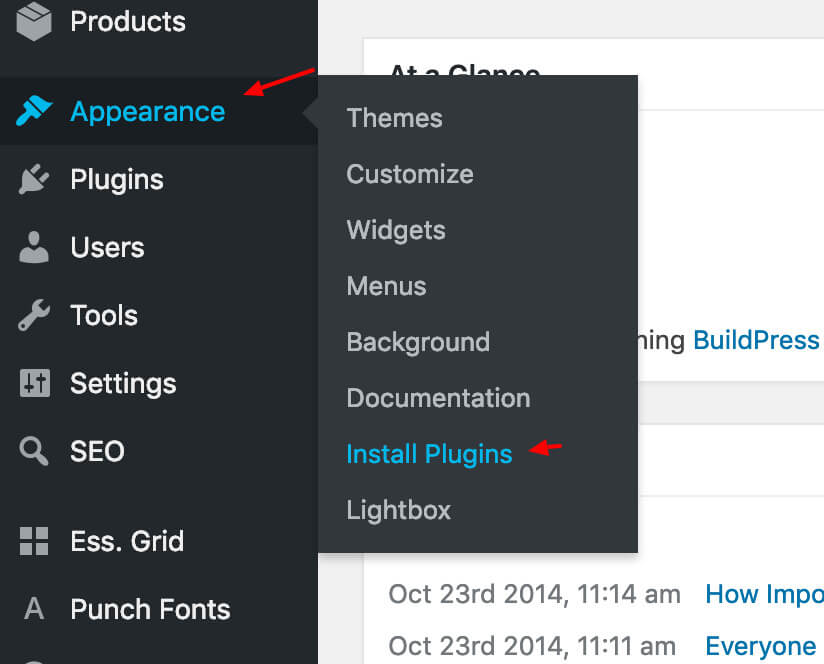
- Go to Appearance › Install Plugins. Install, update and activate Advanced Custom Fields and ACF Repeater Field. (WoonderShop uses Advanced Custom Fields PRO instead, which is also bundled with the theme.)
- Go to Plugins and check that both plugins are active and have no updates waiting.
Once the theme and both ACF plugins are up to date and active, your slider and the other ACF-powered parts of the theme should work again.
Update ACF Repeater Field manually
If Appearance › Install Plugins doesn’t offer the update, install the bundled version yourself:
- Download the latest version of the theme zip file and unzip it.
- Find the file
bundled-plugins/acf-repeater-v2.zipin the unzipped theme folder. - Go to Plugins › Add Plugin › Upload Plugin, upload that zip file, and choose Replace current with uploaded.
To show the ACF settings in your dashboard or edit the theme’s fields, see How to enable or change Advanced Custom Fields (ACF).