
I am using your theme on some old website, which I am planning to delete. Can I deactivate the license key and use the same theme on my new website?
The answer is: it depends if your license is still active or not (read how do I know if my license is still active or has expired?).
- If your theme license is still active then you can deactivate the license from the old domain and activate it on a new one.
- An expired license can still be activated on a new website and keeps receiving theme updates. Only premium support ends when your support period expires, and you can extend it from My Themes in your account.
There are two ways to deactivate a license key from the theme (WordPress site). The first one is possible only if your WordPress site is still available online. The other way is to deactivate the site from your customer dashboard and should be used if your WP site is no longer available online (the site was deleted).
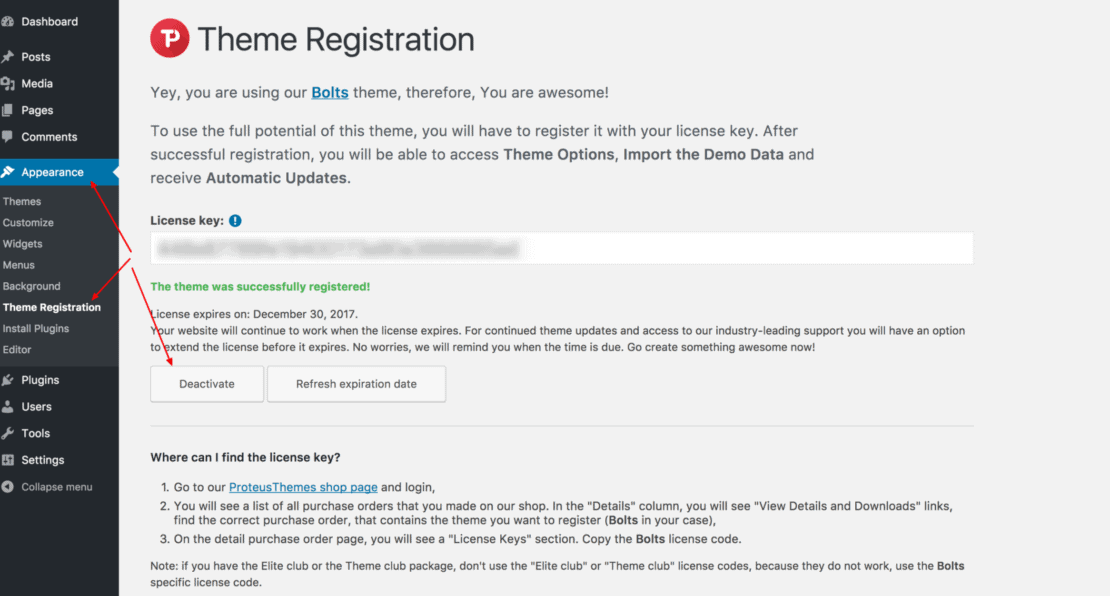
Deactivate theme license on your site
Go to your wp-admin -> Appearance -> Theme Registration and click on Deactivate. You can delete your old website and use the same theme and license key on your new website (only if the license is still active, read above).
Expired licenses can still be activated and receive theme updates, but opening a support ticket needs an active support period. You can extend it from My Themes in your account.
Deactivate theme license in the Customer dashboard
I want to use the license key on my new website, but it says, that it’s already in use on another site. This other site is my old WP site, which I already deleted. How can I register the theme on my new site?
If you were unable to deactivate the theme before you deleted your old WordPress site, you can deactivate the old site in the customer dashboard.
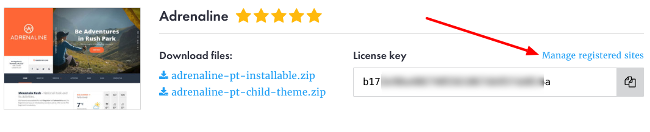
Log in and search for the license key you want to deactivate in the My Themes tab. Click on the Manage registered sites link next to the license key. This will open a popup, with the list of registered sites (URLs). Click on the Deactivate site link next to the site you want to deactivate. This will deactivate the license on the old website and you will be able to use the license key on your new WP site if the license is still active.
Expired licenses can still be activated and receive theme updates, but opening a support ticket needs an active support period. You can extend it from My Themes in your account.